Example: Node.js + React (two-process)
The React take on the Node.js + Angular example. The CoderFlow environment is configured identically — same Express API, same two-process model, same :3001. Everything that changes is on the front end, and it comes down to one thing: where the dev-server proxy is configured.
Both stacks run a Vite dev server — Angular 17+ uses Vite under the hood too — so this isn't "Vite vs not-Vite." The difference is the config surface: Angular keeps Vite behind the CLI and you hand a standalone proxy.conf.js to ng serve, while React (and Vue) expose Vite directly — the proxy is a server.proxy block right inside vite.config.
This page covers only what's different. For the shared concepts — what two-process is, why a public repo needs no credentials, the build-and-run flow — see the Node.js + Angular example.
What you'll need
The same as the Angular example: permission to create environments, and network access from CoderFlow to GitHub (the reference repo is public). See Core Concepts and Environments.
The reference app
The code lives in node-react/ of the reference-apps repo:
-
api/— the same Express API as the Angular example:GET /api/helloon0.0.0.0:3001. -
web/— a React app built with Vite. The proxy lives inweb/vite.config.js:export default defineConfig({plugins: [react()],server: {host: true, // bind 0.0.0.0 so the task proxy can reach itport: 5173,proxy: {"/api": { target: "http://localhost:3001", changeOrigin: true },},},});The
proxyblock does the same job as Angular'sproxy.conf.js— forward/apito the API so the browser talks to one origin — just inline in the Vite config instead of a separate file.
Configure the environment
Follow the Node.js + Angular steps exactly, with these front-end substitutions:
| Angular | React (Vite) | |
|---|---|---|
| Proxy config | proxy.conf.js, passed to ng serve | server.proxy in vite.config.js |
| Dev server command | npx ng serve --proxy-config proxy.conf.js | npm run dev |
| Dev port | 4200 | 5173 |
Concretely, the values that differ from the Angular walkthrough:
- Post-clone Action —
cd node-react/api && npm ci && cd ../web && npm ci - Start Command:
cd /workspace/coderflow-reference-apps/node-react/api && node --watch index.js &cd /workspace/coderflow-reference-apps/node-react/web && npm run dev
- Ports —
5173(name likeweb) and3001(name likeapi). - Launch URLs —
/on port 5173, marked primary.
Everything else is the same: no pre-clone script (Node is already in the base image), and the API still binds 0.0.0.0:3001. The dev server binds 0.0.0.0 via host: true in the Vite config.
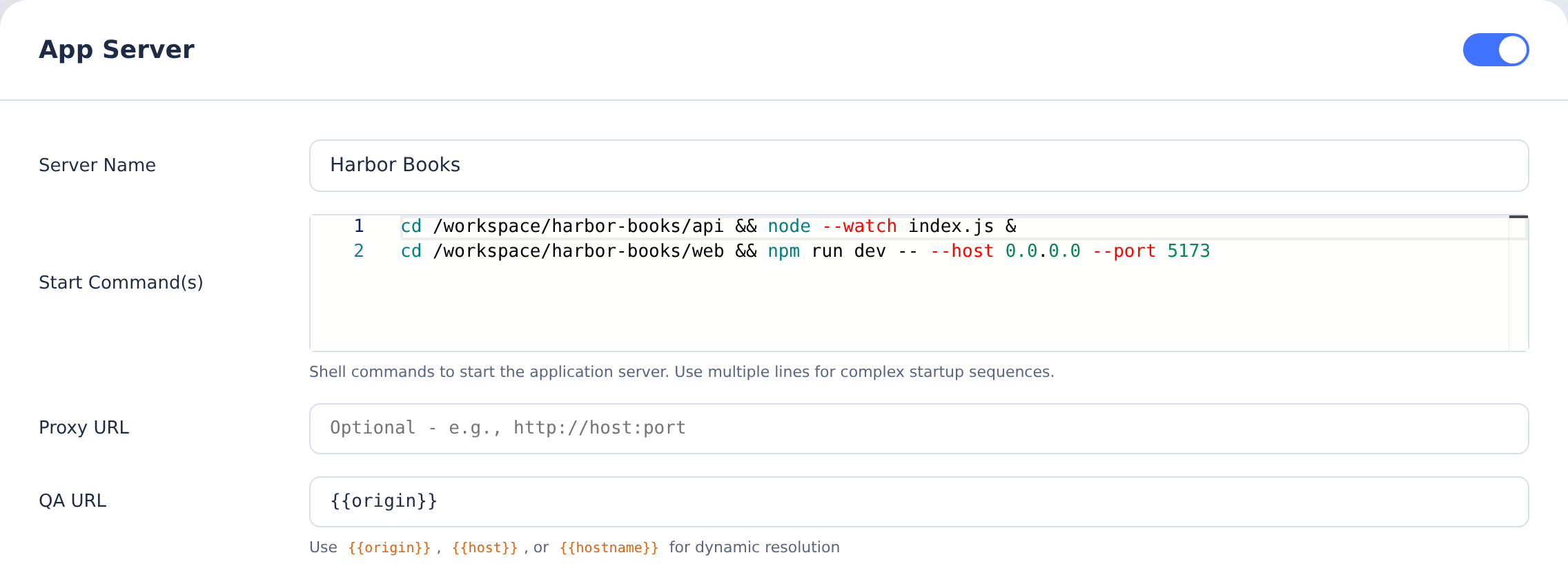
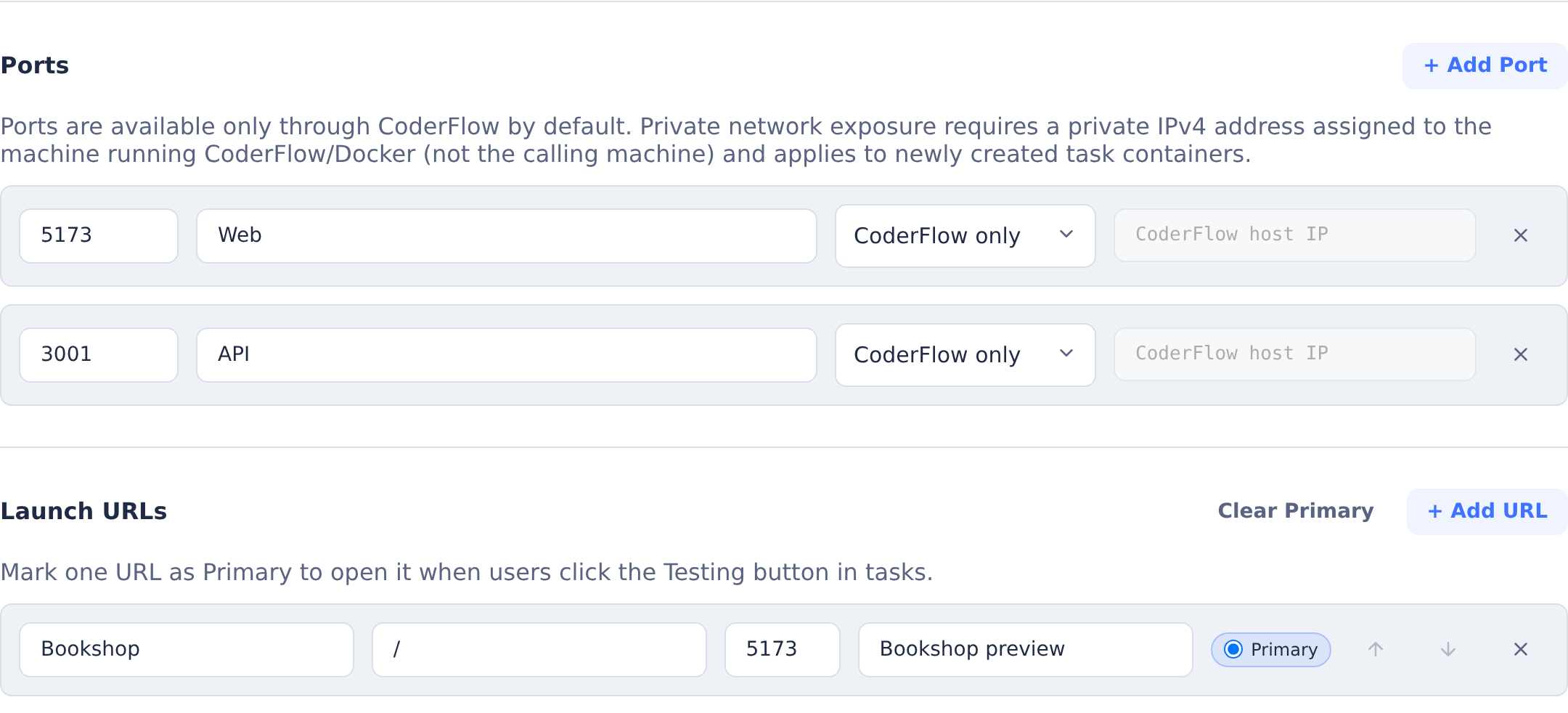
The images show the same two-process setup after copying the app into /workspace/harbor-books. When running the reference repository directly, keep the longer paths in the commands above.
Run and test it
Create a task, open Testing → Start Server (or Start Server & Launch), and click the Launch URL. The React page opens through CoderFlow's task proxy and shows "Hello from the Node.js API!", fetched through the Vite proxy. As the agent edits the front end, Vite hot-reloads it in the browser — the two-process payoff. The API runs under node --watch, so backend edits restart it automatically too — click the page's Reload from API button or refresh to see a new API value. See The Testing Menu.
Notes
- The proxy target. Here the Vite proxy points at
http://localhost:3001. To aim the dev server at a remote API instead, change thetargetinvite.config.js— or read it from an environment variable (the Vite analog of Angular'sAPI_TARGET). - Vue works the same way. Vue is also Vite-based and configures the proxy in
vite.configidentically, so this example covers the Vite mechanism for both React and Vue. The Stack reference has the per-front-end values. - Internal APIs over HTTPS. Same as the Angular example — load your corporate root CA (see CA Certificates) and keep base URLs and credentials on the Secrets tab (Secrets).
Related
- Node.js + Angular — the two-process pattern in full; this page is just the React delta
- Deploy profiles — run the
deployprofile this combination ships, to see the deployment flow end to end - Web Application Environments — the pattern and serving models
- Stack reference — values for other backends and front ends
- Reference apps repo — every backend/front-end combination