IBM i Task Libraries
When an environment has an IBM i connection with the Build feature enabled, CoderFlow creates a temporary IBM i library for each task. This task library is the build target for codermake — it gives every task a fully isolated namespace on the IBM i system so concurrent tasks can compile against the same source without colliding, and so experimental work stays out of shared production libraries.
This page covers how task libraries are named, how they're cleaned up, and what to do when one is left behind.
What's in a Task Library
The task library is a real IBM i library (DB2 schema) on the connected system, owned by the IBM i user profile configured on the connection. While the task is running, agents use codermake inside the container to compile RPG, COBOL, CL, DDS, and SQL source into native IBM i objects, all written into the task library. The library appears in the user's library list ahead of any production libraries, so calls to programs that exist in both paths resolve to the task copy first.
The task library is intended for build artifacts only. Long-lived target libraries — production code, sync targets used by Sync to IBM i, or htdocs deploy directories — are configured separately on the connection and are not part of this lifecycle.
Naming
Library names are generated as:
<prefix>_<24-character-uuid>
For example, AITSK_92AB1F4D8E60C7A2B5031F7E. The prefix comes from the Build Library Name Prefix field on the IBM i connection (1–5 characters, first character A–Z, @, #, or $; remaining characters letters, digits, @, #, $, _, or .). The 24-character suffix is derived from a fresh UUID with the version and variant nibbles removed, then uppercased.
When the library is created, its description is set to:
CoderFlow task <task-id>
This is how you trace a library back to its task in tools like WRKLIB or DSPOBJD — the task ID matches the ID shown in the CoderFlow UI and in the task's URL.
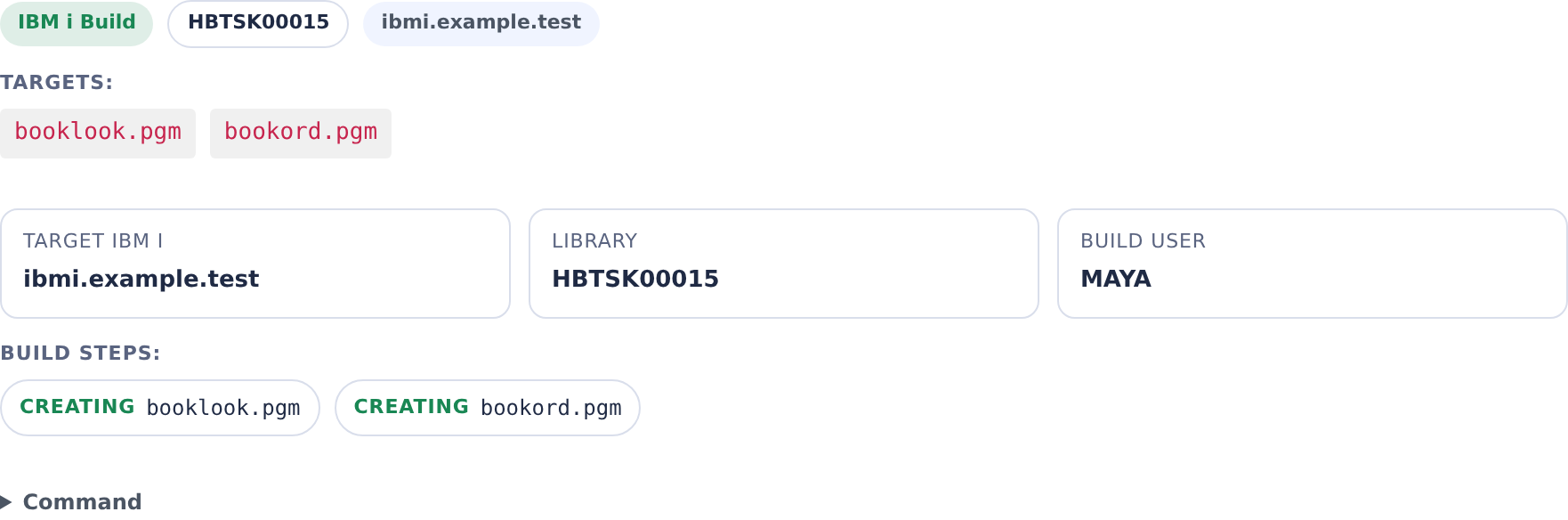
In Agent Activity, select IBM i and expand an IBM i Build entry to see its target library. Use that system library name when inspecting the compiled objects.
Lifecycle
Task libraries follow the lifecycle of the container they belong to:
| Event | What Happens |
|---|---|
| Task starts | Container's entrypoint runs CREATE SCHEMA <library> over SSH, resolves the system library name from QSYS2.SYSSCHEMAS, tags the library with the task description, and exports IBMI_BUILD_LIBRARY and IBMI_BUILD_SCHEMA into the container's shell environment. codermake -t is then run from the connection's Build Repo / Build Directory to initialize the build configuration. |
| Task runs | The agent compiles into the library by invoking codermake. Compiled *PGM, *SRVPGM, *FILE, and *MODULE objects all land here. |
| Container is stopped | A cleanup script registered at task start runs DROP SCHEMA <library> CASCADE over the same SSH connection. On success the library and all of its objects are removed from the IBM i system. |
Because cleanup runs only when the container stops, task libraries persist for as long as the container runs. Pinning a task to extend the container's life also extends the library's life. See Container Lifecycle for the inactivity thresholds and how containers transition between Running, Stopped, and Removed.
Orphaned Libraries
Cleanup can fail to run, leaving a library behind on the IBM i system. The two common causes are:
- Container crash. If the Docker host is killed or the container terminates abruptly, the cleanup script never executes. The container's normal shutdown path is what triggers the
DROP SCHEMA— there is no IBM i-side timer or watchdog that cleans up libraries on its own. - Object locks. If an active job on the IBM i system holds a lock on any object in the library when the container shuts down — for example, a debugger session, a running RPG program, or an open DB2 cursor —
DROP SCHEMA <library> CASCADEfails. The error is logged in the container's shutdown output but the container is allowed to terminate, leaving the library in place.
Identifying Orphaned Libraries
Every task library carries the task ID in its description. To find candidates for cleanup, list libraries that match your prefix and look at the description text:
WRKLIB LIB(<prefix>*)
Or, from QShell:
db2 "SELECT SCHEMA_NAME, SYSTEM_SCHEMA_NAME FROM QSYS2.SYSSCHEMAS WHERE SCHEMA_NAME LIKE '<prefix>\_%' ESCAPE '\\'"
Then cross-reference the task IDs with the CoderFlow task list (or task URLs). A library whose task is no longer running, has been removed, or has a stopped container is a cleanup candidate.
Manual Cleanup
Once you've confirmed no IBM i job is holding objects in the library, delete it with:
DLTLIB LIB(<library-name>)
DLTLIB honors the same locks that broke the original DROP SCHEMA — if the library has active locks, the command fails with CPF210B or similar. End the locking job (ENDJOB) or wait for it to finish, then retry. Avoid DLTLIB OPTION(*IGNORE) unless you've confirmed nothing critical is using the locked object.
For a backlog of orphans, end any related jobs first (WRKACTJOB to find them), then run DLTLIB in a loop or a CL program. There is no CoderFlow-side bulk cleanup UI today.
What's Not in a Task Library
Some IBM i objects related to a task live outside the task library:
- Source members written by Sync to IBM i — these go to a target library you choose at sync time, not the build library. The target library persists across tasks.
- Profound UI htdocs files deployed by the Profound UI htdocs Files feature — these go to the IFS path configured on the connection, not the task library.
objx/objxsrcanalyzer libraries used by Import IBM i Sources and Generate IBM i Build Rules — these are a single shared utility library (defaultPLOBJX) installed on first use and reused across sessions.
None of these are subject to the task library lifecycle. They have their own creation and cleanup rules.
Configuration Reference
| Setting | Where | Notes |
|---|---|---|
| Build Library Name Prefix | IBM i connection (Build feature) | 1–5 characters; required when Build is in scope tasks. Determines the library's prefix. |
| Build Repo | IBM i connection (Build feature) | Which environment repository codermake runs in. Required. |
| Build Directory | IBM i connection (Build feature) | Optional subdirectory inside the build repo. The container cds here before running codermake. |
The generated schema name is longer than IBM i's 10-character system library name. CoderFlow resolves the system name through SYSTEM_SCHEMA_NAME; use that name when inspecting the library with IBM i tools.