Webhooks & SCM Triggers
Inbound webhooks and SCM polling let external systems start CoderFlow automations without a user clicking Run Now.
Use webhooks when the source system can reach your CoderFlow server over HTTPS and can send an event immediately. Use SCM polling when the Git host cannot call back into CoderFlow, but CoderFlow can reach the Git host API on a schedule.
Prerequisites
- An administrator account in CoderFlow
- An environment with at least one automation
- For SCM polling, a GitHub or Azure DevOps Git provider assigned to the repository in the environment
- For public webhook URLs, HTTPS termination through your reverse proxy, tunnel, or webhook-only ingress listener
Webhooks and SCM polling are managed from Administration -> Environments -> Automations. The Automations subtab creates the work to run. The Webhooks subtab creates inbound URLs and links them to automations.
Webhooks vs SCM Polling
| Trigger | Best for | How it runs |
|---|---|---|
| Inbound webhook | GitHub push events, Stripe events, SaaS callbacks, internal build systems | The sender posts JSON to a secret CoderFlow URL. CoderFlow triggers every linked automation. |
| SCM polling | Private Git hosts or networks where the Git host cannot reach CoderFlow | A scheduled automation checks the watched branch and only runs when the resolved commit SHA changes. |
Do not confuse these automation webhooks with Slack ingress. Slack uses its own /api/slack/* endpoints and configuration described in Slack.
Create a Webhook-Triggered Automation
- Open Administration -> Environments.
- Select the environment.
- Open Automations -> Automations.
- Click Add Automation.
- Choose a Run Target card at the top:
- Custom instructions for a normal task
- Task template for a parameterized task
- Deployment profile for a deployment automation
- Publish docs to publish a repository’s hosted docs site
- IBM i Import to import changed IBM i sources
- Enter a Name in General, set Frequency in Schedule to None (webhook only) if it should never run on a schedule, and complete the target’s fields in Run Configuration.
- Save the automation. Correct any inline field errors shown by Save.
A webhook can also link to a scheduled automation. In that case the automation can run from both its schedule and from inbound deliveries.
Create an Inbound Webhook
- Open Administration -> Environments -> Automations -> Webhooks.
- Click Add Webhook.
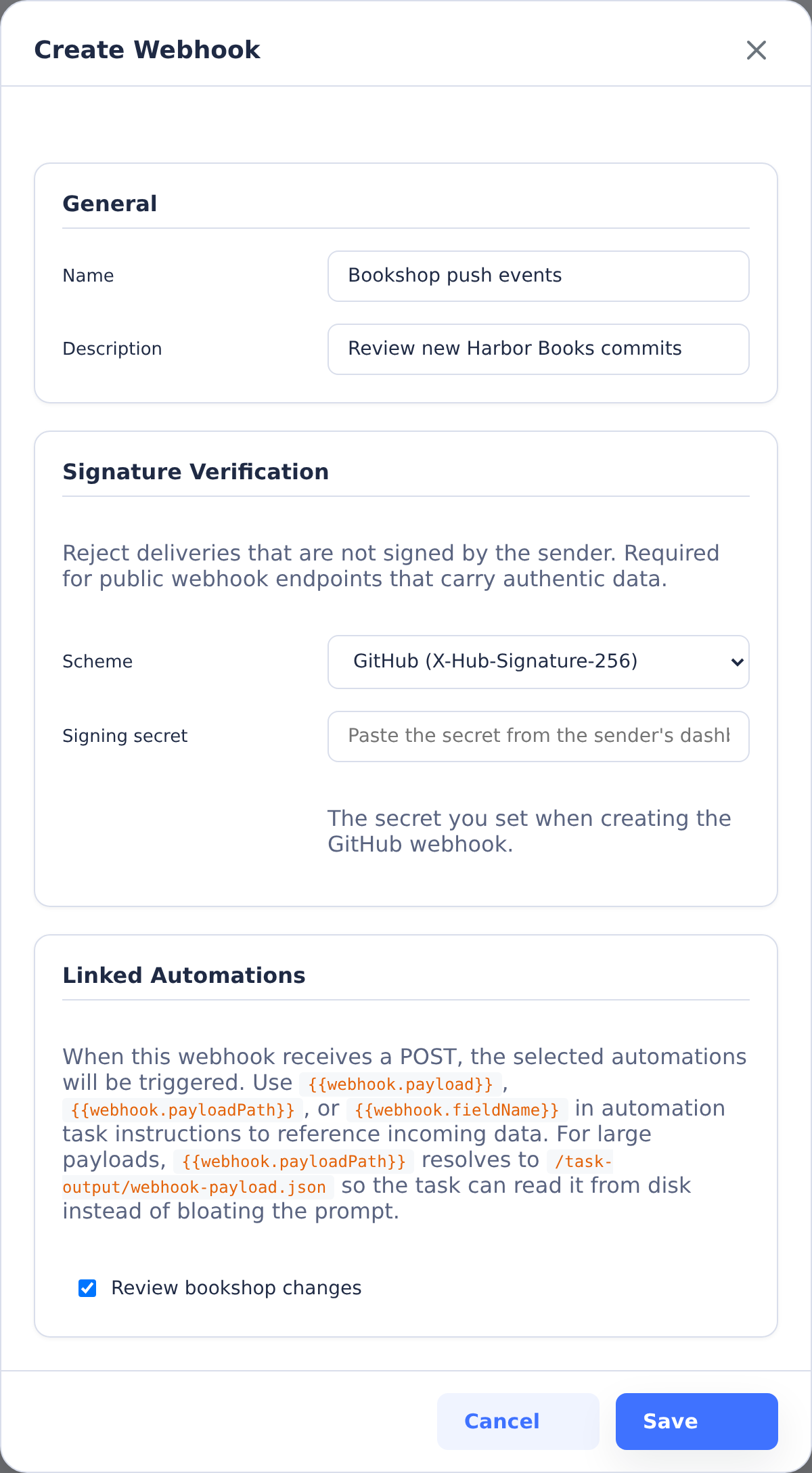
- Enter a Name and optional Description.
- Choose a Signature Verification scheme.
- Select one or more Linked Automations.
- Save the webhook.
- Copy the generated Webhook URL.
The inbound URL has this shape:
https://<server>/api/webhooks/inbound/<token>
The token is secret. Treat the URL like a credential, and use Regenerate if it is exposed. Regenerating the URL immediately invalidates the old token.
Delivery Behavior
Each accepted POST triggers every linked automation in the same environment. CoderFlow does not currently add per-event filters inside the webhook definition. If one sender emits multiple event types to the same webhook, either configure the sender to send only the events you want or make the automation inspect {{webhook.fieldName}} / {{webhook.payloadPath}}.
Inbound bodies are parsed as JSON. The main server and the webhook-only listener both accept JSON payloads up to 10 MB. Delivery history stores a truncated preview for large payloads, but automation tasks receive the full payload through /task-output/webhook-payload.json.
The inbound endpoint returns:
200for accepted, delivered, skipped, or disabled deliveries207when some linked automations failed and others succeeded401when signature verification fails404for unknown tokens429when the same webhook receives deliveries faster than the per-webhook cooldown
Signature Verification
Signature verification is optional, but public webhook URLs should use it whenever the sender supports signing.
| Scheme | Header CoderFlow verifies | Notes |
|---|---|---|
| None | None | Relies only on the URL token. Use only for low-risk internal senders. |
| GitHub | X-Hub-Signature-256 | HMAC-SHA256 over the raw body, formatted as sha256=<hex>. |
| Stripe | Stripe-Signature | Verifies the t=<timestamp>,v1=<hex> signature with replay protection. |
| Svix | svix-id, svix-timestamp, svix-signature | Accepts whsec_ secrets and verifies v1 signatures. |
| Generic HMAC-SHA256 | X-Signature-256 or X-Signature | HMAC-SHA256 over the raw body. The value may be bare hex or sha256=<hex>. |
When a signed scheme is selected, paste the sender's signing secret into Signing secret. The API never returns that secret later; the edit form only shows whether one is configured.
Use Payload Data in Automations
Automation task names and instructions can read webhook data:
{{webhook.payload}}inserts the full JSON payload as a string.{{webhook.payloadPath}}resolves to/task-output/webhook-payload.json.{{webhook.fieldName}}inserts a top-level field from the JSON payload, such as{{webhook.ref}}or{{webhook.type}}.
Prefer {{webhook.payloadPath}} for large payloads. It keeps the prompt smaller while still giving the agent or deployment script access to the complete request body.
For deployment-profile automations, the same payload file is placed in the deploy task output directory, so deployment scripts can read it from /task-output/webhook-payload.json.
Worked Examples
Set WEBHOOK_URL to the URL copied from the webhook modal.
GitHub Push
In GitHub, create a repository webhook:
- Set Payload URL to the CoderFlow webhook URL.
- Set Content type to
application/json. - Set Secret to the same value saved in CoderFlow.
- Select Just the push event.
- Save.
To test a GitHub-style delivery with curl:
WEBHOOK_URL="https://coderflow.example.com/api/webhooks/inbound/<token>"
GITHUB_SECRET="replace-me"
payload='{"ref":"refs/heads/main","after":"0123456789abcdef0123456789abcdef01234567","repository":{"full_name":"example/app"},"head_commit":{"id":"0123456789abcdef0123456789abcdef01234567","message":"Test push"}}'
signature=$(printf '%s' "$payload" | openssl dgst -sha256 -hmac "$GITHUB_SECRET" -hex | awk '{print $2}')

curl -sS -X POST "$WEBHOOK_URL" \
  -H "Content-Type: application/json" \
  -H "X-Hub-Signature-256: sha256=$signature" \
  -d "$payload"
Stripe Event
In Stripe, create a webhook endpoint that points at the CoderFlow webhook URL and copy the endpoint signing secret into CoderFlow with the Stripe scheme.
To test a Stripe-style delivery:
WEBHOOK_URL="https://coderflow.example.com/api/webhooks/inbound/<token>"
STRIPE_WEBHOOK_SECRET="whsec_replace_me"
payload='{"id":"evt_test","type":"payment_intent.succeeded","data":{"object":{"id":"pi_test"}}}'
timestamp=$(date +%s)
signature=$(printf '%s.%s' "$timestamp" "$payload" | openssl dgst -sha256 -hmac "$STRIPE_WEBHOOK_SECRET" -hex | awk '{print $2}')

curl -sS -X POST "$WEBHOOK_URL" \
  -H "Content-Type: application/json" \
  -H "Stripe-Signature: t=$timestamp,v1=$signature" \
  -d "$payload"
Generic JSON
For an internal sender, either use the None scheme on a private network or use Generic HMAC-SHA256 with a shared secret.
WEBHOOK_URL="https://coderflow.example.com/api/webhooks/inbound/<token>"
payload='{"event":"nightly-smoke","sha":"0123456789abcdef0123456789abcdef01234567","service":"billing"}'

curl -sS -X POST "$WEBHOOK_URL" \
  -H "Content-Type: application/json" \
  -d "$payload"
With generic HMAC signing:
WEBHOOK_URL="https://coderflow.example.com/api/webhooks/inbound/<token>"
SHARED_SECRET="replace-me"
payload='{"event":"nightly-smoke","sha":"0123456789abcdef0123456789abcdef01234567","service":"billing"}'
signature=$(printf '%s' "$payload" | openssl dgst -sha256 -hmac "$SHARED_SECRET" -hex | awk '{print $2}')

curl -sS -X POST "$WEBHOOK_URL" \
  -H "Content-Type: application/json" \
  -H "X-Signature-256: sha256=$signature" \
  -d "$payload"
Delivery History
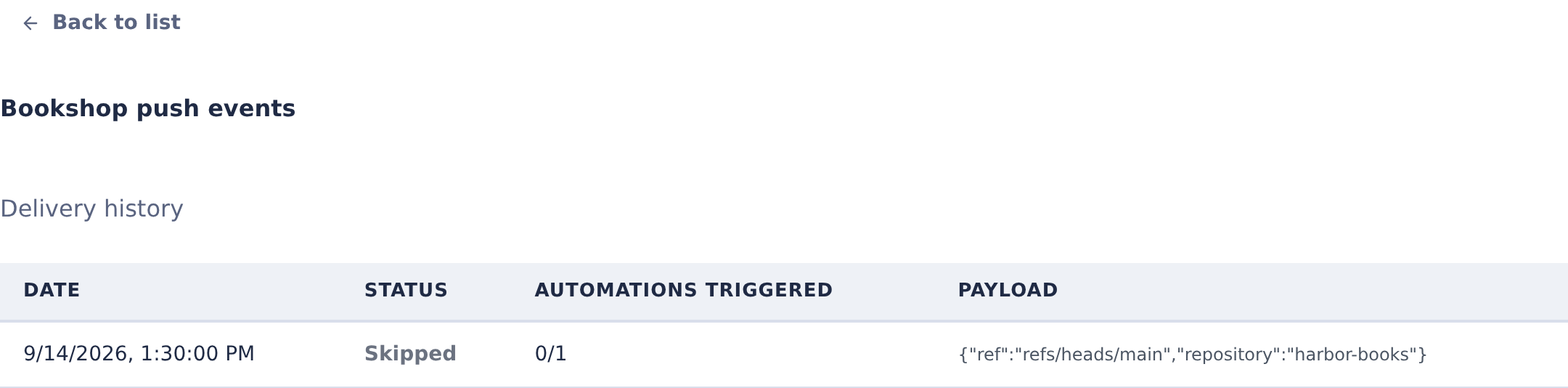
Open Automations -> Webhooks, then click History on a webhook row. History shows recent deliveries, delivery status, linked automation results, and a payload preview.
History is retained per webhook. The default retention is 30 days, and the service periodically removes older records.
Optional Webhook-Only Ingress Listener
By default, inbound webhook deliveries are served by the main CoderFlow server. Production deployments can expose a smaller route surface by starting a webhook-only listener:
WEBHOOK_INGRESS_MODE=listener
WEBHOOK_INGRESS_PORT=3003
WEBHOOK_INGRESS_HOST=0.0.0.0
WEBHOOK_INGRESS_PORT by itself also enables listener mode. WEBHOOK_INBOUND_PORT and WEBHOOK_INBOUND_HOST are accepted aliases.
The listener serves only:
GET /healthPOST /api/webhooks/inbound/:token
It does not serve the CoderFlow UI, authenticated webhook management APIs, or static assets. This isolates routes and ports, but it is not a separate process or privilege boundary; it runs inside the same Node process as the main server.
Configure SCM Polling
SCM polling is a modifier on a scheduled automation. The schedule still decides when CoderFlow wakes up. The poll decides whether that scheduled tick should actually run.
- Open Administration -> Environments -> Automations.
- Create or edit an automation with a real schedule. Choose Custom instructions, Task template, Deployment profile, or Publish docs as the run target. SCM polling is not available for None (webhook only) automations or IBM i Import.
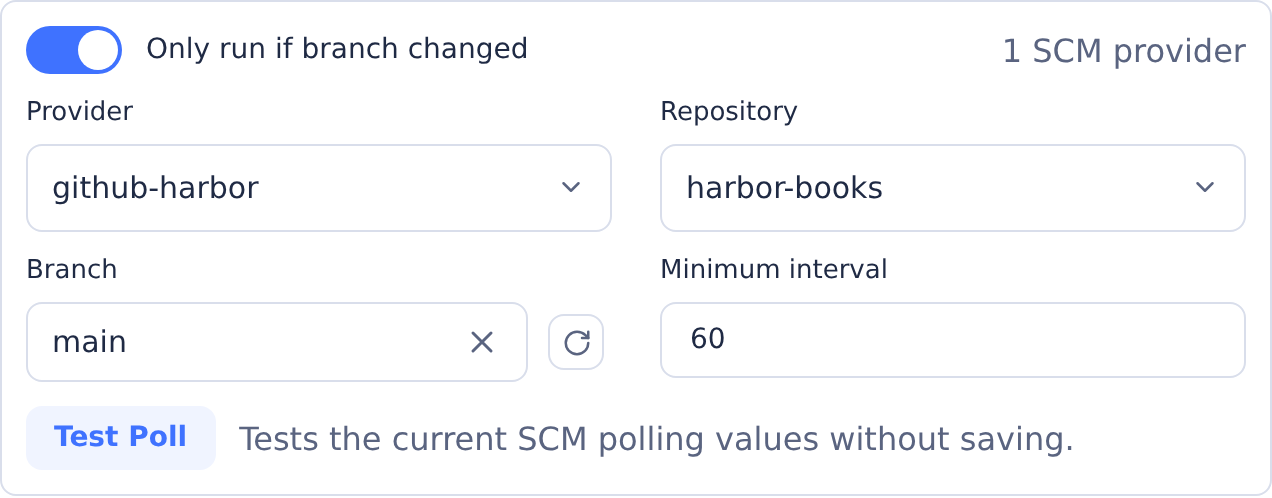
- In Schedule, enable Only run if branch changed.
- Select the Git Provider.
- Select the Repository.
- Select or type the Branch.
- Leave Minimum interval at
60seconds unless you need a slower guardrail. - Save the automation.
For a new automation, the polling controls appear in Schedule when the installation supports SCM polling and the environment has a supported Git provider assigned to a repository. Provider and Repository share a row; Branch and Minimum interval share the next. Existing polling configurations or loading/configuration problems may keep the section visible for diagnosis. Switching to IBM i Import hides and clears SCM polling. SCM polling is enabled by default; administrators can disable it in setup configuration with:
{
  "scm_polling": {
    "enabled": false
  }
}
Click Test Poll on an existing automation to validate the current values without updating the stored polling baseline.
What SCM Polling Checks
For GitHub, CoderFlow calls the commits API for the watched branch and reuses the provider token configured in Git Providers. For Azure DevOps, CoderFlow calls the branch stats API for the watched branch. In both cases, the service keeps a state file under the server data directory and compares the new commit SHA with the last stored SHA.
The first successful poll records the current SHA as the baseline and does not run the automation. Later polls run only when the watched SHA changes.
When polling triggers a task or deployment, CoderFlow records the run as scm-poll and stores the provider, repository, branch, old SHA, new SHA, commit message, author, commit URL, and poll latency in automation history.
Task names and instructions can use SCM polling values:
{{scmPoll.providerName}}{{scmPoll.repo}}{{scmPoll.branch}}{{scmPoll.oldSha}}{{scmPoll.newSha}}{{scmPoll.commitMessage}}{{scmPoll.author}}{{scmPoll.commitUrl}}
Checkout and Environment Variables
SCM polling passes the watched branch and SHA into the task or deployment environment. The repository name is uppercased and hyphens become underscores.
For a repository named customer-api, a poll-triggered run on branch main at SHA 0123... receives:
CUSTOMER_API_BRANCH=main
CUSTOMER_API_TRIGGER_SHA=0123456789abcdef0123456789abcdef01234567
CUSTOMER_API_SHA=0123456789abcdef0123456789abcdef01234567
*_BRANCH selects the branch. *_TRIGGER_SHA is an audit value. *_SHA pins the clone to the exact commit CoderFlow observed, so the task does not silently run against a newer branch head if the branch advances again during startup.
Advanced Polling Fields
The UI edits the common single-branch configuration. Existing automations created through API or setup data may also include advanced fields, which the UI preserves when the provider and repository do not change:
{
  "providerName": "github-main",
  "repo": "customer-api",
  "branches": ["main", "release/*"],
  "minIntervalSeconds": 60,
  "paths": ["src/api/**", "package.json"],
  "webhookDedupWindowSeconds": 300,
  "backoff": {
    "baseSeconds": 30,
    "maxSeconds": 1800,
    "threshold": 3
  }
}
brancheswatches several exact branches or glob patterns. It is mutually exclusive withbranch.pathsruns only when a changed file in the full old-SHA-to-new-SHA range matches one of the glob patterns.webhookDedupWindowSecondsprevents duplicate runs when a webhook and SCM polling both see the same SHA. The default is 300 seconds. Set it to0to disable deduplication.backoffcontrols exponential backoff after repeated provider errors.
For multi-branch polling, each advanced branch that changes can create its own automation run.
Webhooks and Polling Together
You can configure both a Git push webhook and SCM polling for the same automation. This is useful when webhooks are usually available but you want polling as a backup.
CoderFlow deduplicates GitHub push, Azure DevOps git.push, and generic payloads with a top-level sha field when they match the same automation and SHA within the dedup window. If the webhook already started a run, the next poll skips that SHA. If polling already started a run, the webhook skips that SHA.
Troubleshooting
The webhook returns 404
The token is unknown or too short. Copy the URL from the webhook modal again. If you regenerated the URL, update the sender.
The webhook returns 401
Signature verification failed. Confirm the selected scheme, signing secret, and exact body sent by the sender. HMAC signatures are calculated over the raw request body, so formatting changes can invalidate the signature.
The webhook returns 429
The same webhook is receiving deliveries faster than the cooldown. Reduce sender retries or create separate webhooks for independent high-volume event streams.
A delivery was accepted but no automation ran
Check that the webhook is enabled, has linked automations, and the linked automations are enabled. Delivery history shows skipped, failed, and triggered automation results.
The SCM polling section is missing
Confirm the automation has a schedule, not None (webhook only). Confirm the environment repository uses a GitHub or Azure DevOps Git provider. If the installation has scm_polling.enabled set to false, the UI hides the section and the server rejects scmPoll saves.
Test Poll fails
Check the provider credentials in Git Providers, the repository URL, and the branch name. For Azure DevOps, the repository URL must use the https://dev.azure.com/<organization>/<project>/_git/<repository> form.
Polling is delayed after failures
After repeated provider errors, CoderFlow backs off future polls for that automation or branch. Open the automation History view to see SCM polling state, last errors, metrics, and the next poll attempt time.