Scheduled Questions
A scheduled question is a question Portal asks for you on a schedule, for example Which titles need reordering today? every weekday morning. Each run is answered like a question you type in Ask, with your own access to data, and the answer waits for you under Automations.
Before you start
- An administrator turns on Allow scheduled questions for the workspace, and Allow hourly schedules if questions may run every hour. See Portal Setup.
- You need data access (
portal:data) and permission to use automations (automations:use) in the workspace. - Creating, changing and deleting scheduled questions needs the Full edition of CoderFlow. In CoderFlow Essentials you can only turn existing questions on or off and use Run now.
The Automations section appears in the sidebar once scheduled questions are available to you. If an administrator turns them off later, your questions stay listed with IT hasn’t turned on scheduled questions in this environment., and they don't run.
Create a scheduled question
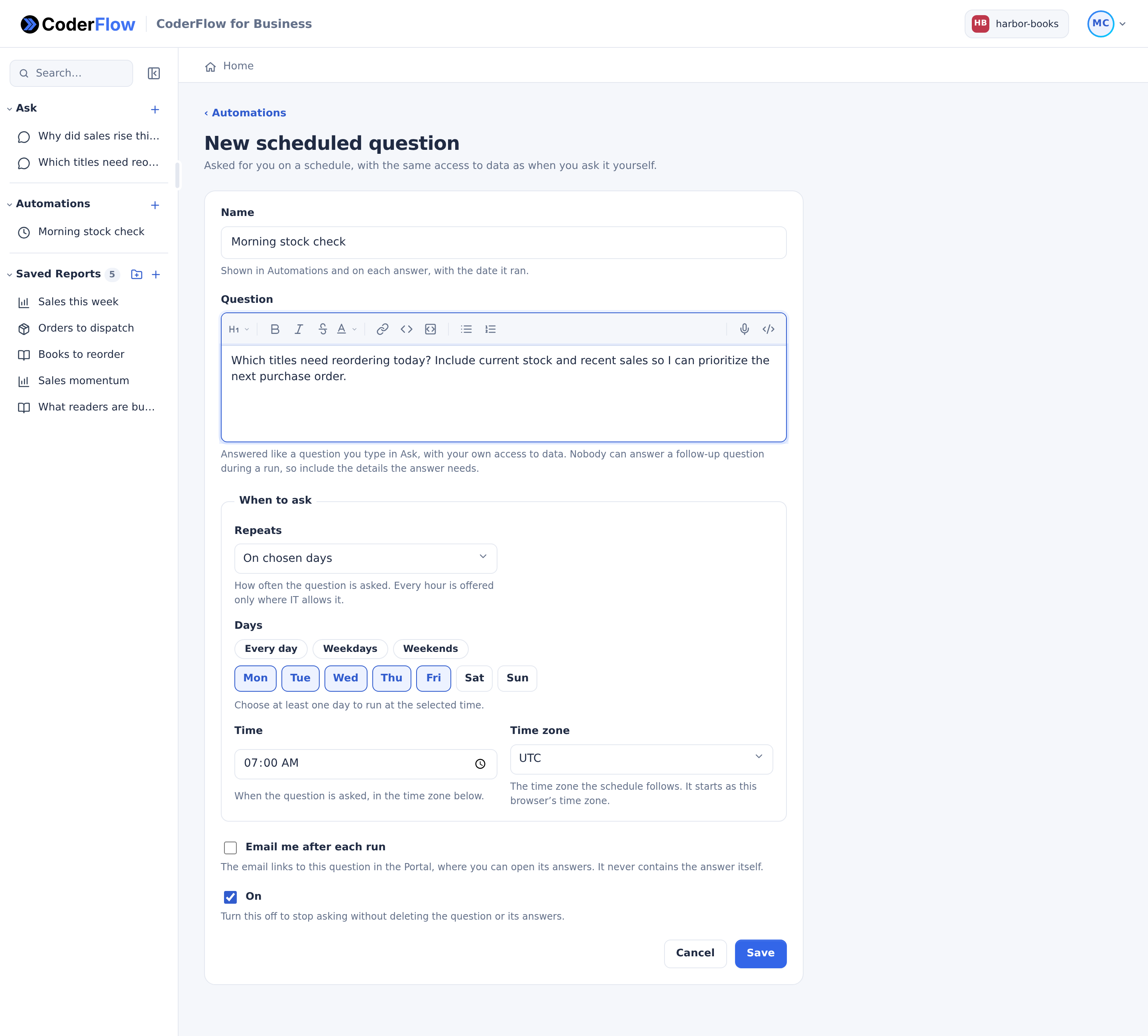
Click New scheduled question: the + on the sidebar's Automations heading, or the button on the Automations page.
To schedule a question you have already asked, open its conversation in Ask and click Schedule…. The form opens with the conversation's name and its first question filled in.
Fill in the form:
| Field | What to enter |
|---|---|
| Name | Up to 100 characters, on one line. It is shown in Automations and on each answer, with the date it ran. |
| Question | Up to 4,000 characters of text, without images or files. Nobody can answer a follow-up question during a run, so include everything the answer needs. |
| Repeats | On chosen days, Monthly, or Every hour. Every hour is offered only where IT allows hourly schedules; otherwise a question runs at most once a day. |
| Days | For On chosen days and Every hour. Pick days, or use Every day, Weekdays or Weekends. Monday to Friday is selected at first. |
| Day of the month | For Monthly: 1 to 28, so the question is asked every month. |
| Time | For On chosen days and Monthly. 7:00 AM at first. |
| From and Until | For Every hour: the question is asked on the hour, every hour from the first time to the last, both included. 8 AM to 5 PM at first. |
| Time zone | The time zone the schedule follows. It starts as your browser's. |
| Email me after each run | Off at first. See Emails. |
| On | On at first. Turn it off to stop asking without deleting the question or its answers. |
Click Save. The question's page opens.
You can have up to 10 scheduled questions turned On in a workspace. To add another, turn one off first. Questions that are off don't count.
Find the answers
The Automations page lists your scheduled questions with their schedule, their next and last run, and a status: On, Off, Asking now, Last run didn’t finish or Needs a new time. Times are shown in each question's time zone, which is named when it differs from your browser's.
Open a question to see its Answers, newest first. Each run shows when it ran, whether On schedule or by Run now, and its status:
| Status | Meaning |
|---|---|
| Asking… | The answer is being prepared. Watch the answer opens it. |
| Answered | Open answer opens it. |
| Didn’t finish | The answer failed or took too long. |
| Not asked | The run couldn't start, for example because you lost access. The reason is shown. |
| Stopped | The answer was stopped. |
An answer opens like an Ask conversation, headed Answer to the question's name, with Open schedule to go back. It isn't listed under Ask. Reply to it to keep it: the conversation then moves to Ask (its run shows Open in Ask).
The newest 30 answers are kept. Older answers you haven't replied to are deleted.
Run now, turn off, change or delete
- Run now asks the question at once, also when the question is off. The answer appears under Answers when it is ready. It is disabled while an answer is still being prepared; wait a few seconds between runs.
- To turn a question off or on, clear or select On, then click Save changes.
- To change a question, edit the form and click Save changes. Discard changes goes back to what is saved.
- Delete… asks Delete scheduled question? Keep Also delete its saved answers selected to delete them too; clear it to move them to Ask. Answers you replied to are already in Ask and stay there. An answer still being prepared is moved to Ask. Click Delete to confirm.
In CoderFlow Essentials, the form is read-only except On, and New scheduled question, Schedule… and Delete… aren't offered.
Emails
With Email me after each run selected, Portal emails you when a run's answer is ready, or when it didn't finish. The email links to the question's page in Portal. It never contains the answer itself. No email is sent for a stopped run or one that never started.
Emails need the server's email to be set up and an email address on your account. To stop emails for every scheduled question, clear Scheduled question emails in Personal Settings.
How runs work
- A run uses your access at the time it runs: your permissions, your IBM i login and your personal secrets, with the same assistant as Ask.
- One answer is prepared at a time for each question. A scheduled time that comes while the previous answer is still being prepared is skipped.
- An answer still running 90 minutes after its run started is stopped: The answer took too long, so it was stopped.
- If you lose data access or permission to use automations in the workspace, the next run is Not asked, with the reason, and the question is turned off.
- Scheduled runs are skipped while IT has scheduled questions turned off or the environment is disabled. While the environment is a draft, only the people who manage it can use it: their questions keep running, and other people's runs are recorded as Not asked with the reason. Either way the question stays on and runs again once things are back to normal.
- A question that runs every hour shows Needs a new time if IT no longer allows hourly schedules, and doesn't run until you choose a daily, weekly or monthly time.
- A scheduled time that passes while the CoderFlow server is down is not made up later.
IT can see, turn off or delete your scheduled questions, but not create, change, turn on or run them.
Ask CoderFlow
Ask CoderFlow reads, in the Full edition, your scheduled questions and their runs, with each answer's name while you can still open it. It can link you to Automations, New scheduled question, a question's form, On, Run now or Delete… in Portal, where you use the control yourself. It doesn't create, change or run scheduled questions; they run only from Portal.