Working with Objectives
Objectives are where you plan, draft, and refine your requirements before executing work. They provide a permanent space to develop your ideas—from initial rough concepts through to well-defined specifications ready for AI agents to implement.
When to Use Objectives
For simple, straightforward tasks where you know exactly what needs to be done, you can create and launch a task directly. But objectives become valuable when:
- Requirements need refinement: You have a general idea but need to work through the specifics
- Work is complex: The task benefits from being broken down into smaller pieces
- You expect iteration: You'll likely need multiple attempts to get the implementation right
- You want history: You want to track how requirements evolved and compare different approaches
Think of objectives as living documents that grow more precise over time, informed by the results of tasks launched from them.
The Objective Tree
Objectives are hierarchical. A top-level objective can contain sub-objectives, which can contain their own sub-objectives, and so on. The home page displays this structure as an interactive tree view.
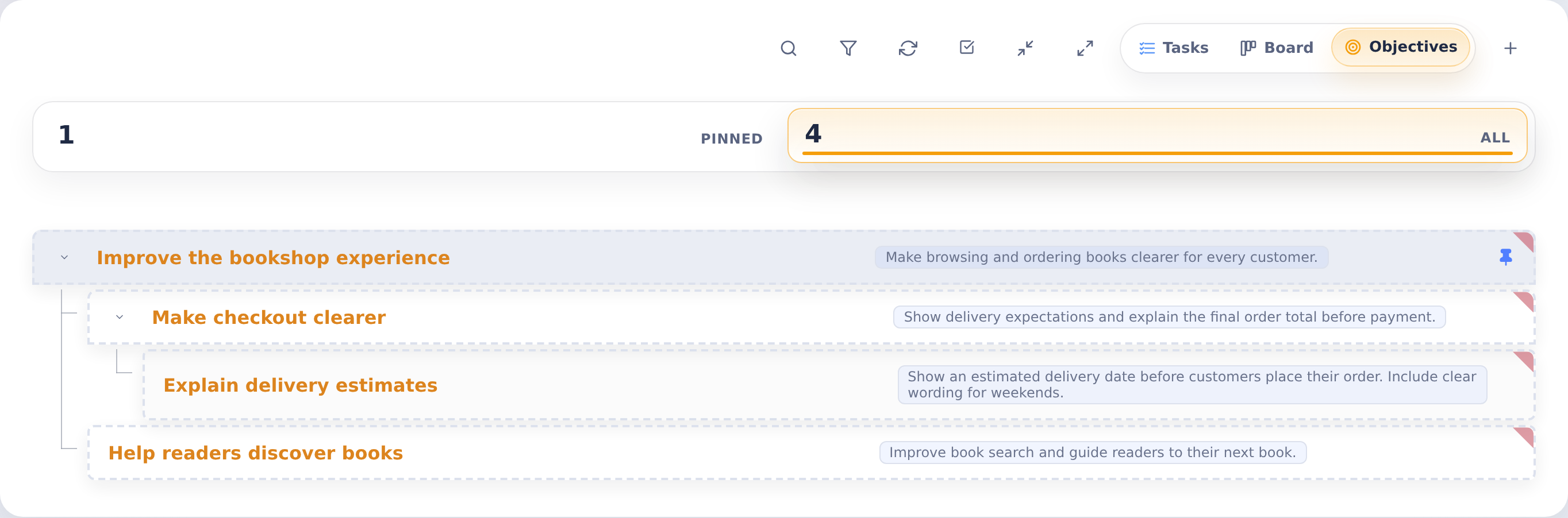
This hierarchy lets you:
- Break down large initiatives: Decompose "Redesign the checkout flow" into discrete pieces like "Update cart summary," "Add payment options," "Improve confirmation page"
- Organize related work: Group objectives by feature area, sprint, or any structure that makes sense for your team
- Track progress visually: See at a glance which parts of a larger initiative have been addressed
Sub-objectives inherit context from their parents, making it easy to understand where each piece fits in the bigger picture.
Creating Objectives
Create a new objective from the home page or objectives view. Provide:
- Name: A clear, descriptive title for the work
- Environment: Which development environment (Docker image) agents should use
- Instructions: Detailed requirements, context, and any specific guidance for agents
- Attachments: Screenshots, mockups, documentation, or other reference materials
- Agents: Which AI agents can work on this objective (Claude, Codex, Gemini, Bob, Grok, Kimi)
For sub-objectives, select a parent objective to nest under. The new objective appears in the tree beneath its parent.
Launching Tasks
When you're ready to execute work defined in an objective, launch a task from it:
- Open the objective
- Choose which agent(s) to use (you can override the objective's defaults)
- Decide whether to launch immediately or as a staged task
- Launch
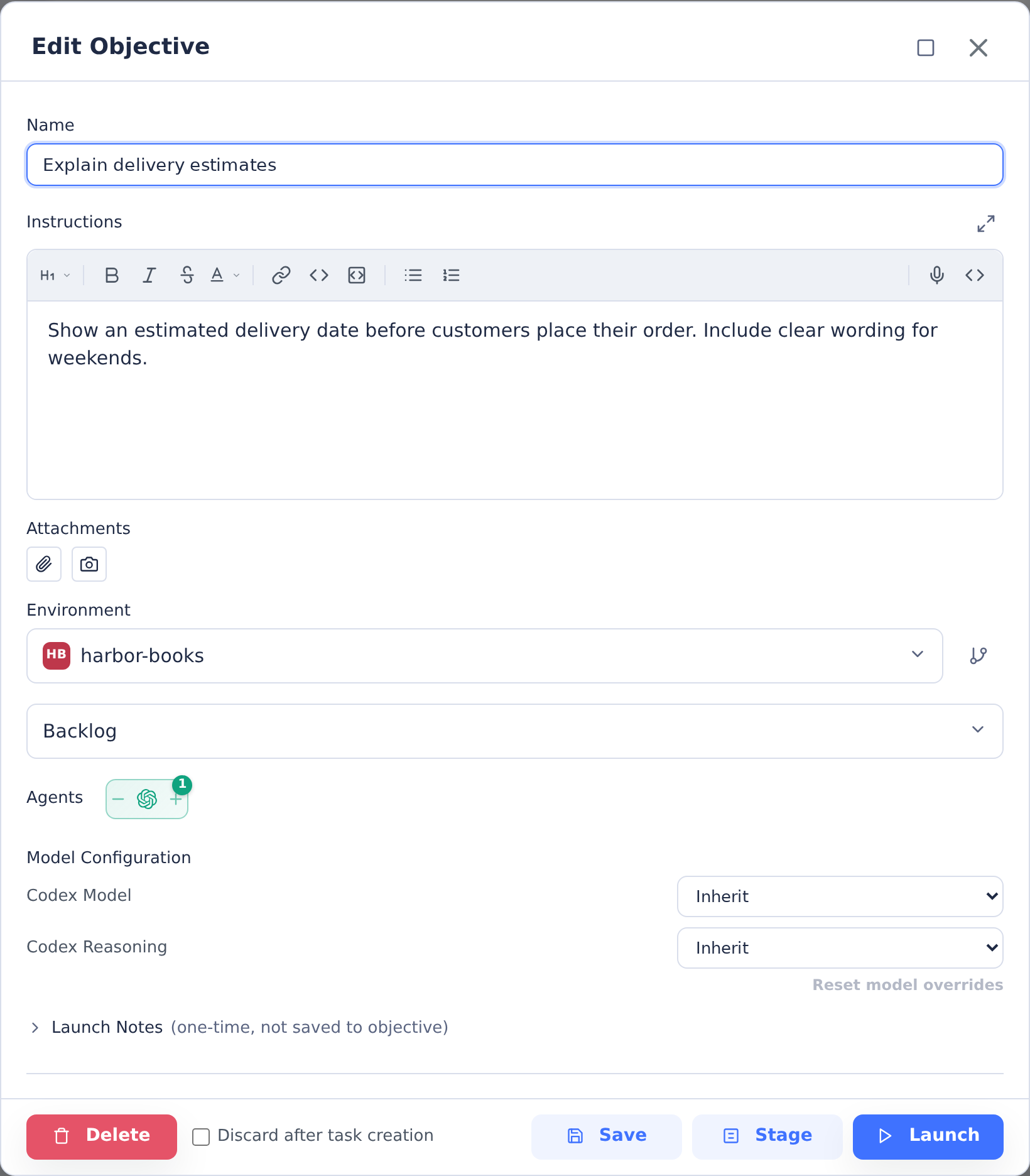
Launching creates a new, independent task that runs in its own container. The objective itself remains unchanged—it's the parent record that tracks all tasks launched from it.
You can launch multiple tasks from the same objective:
- Run the same objective with different agents to compare approaches
- Iterate on requirements by launching new tasks after refining the objective
- Re-attempt work if an earlier task didn't produce satisfactory results
The Iterative Workflow
Objectives shine in an iterative workflow:
-
Start with what you know: Create an objective with your initial understanding of the requirements. It doesn't need to be perfect.
-
Launch and observe: Run a task from the objective. Watch how the agent interprets your instructions and what questions or assumptions arise from its work.
-
Learn and refine: Review the results. Often, seeing an agent's attempt reveals gaps or ambiguities in the original requirements. Update the objective with what you learned.
-
Relaunch: Submit another task with the improved requirements. Each iteration brings you closer to the right solution.
This cycle continues until the work meets your expectations. Throughout, the objective serves as your canonical requirements document, improving with each iteration.
Managing Your Work
Pinning
Pin objectives you're actively working on to keep them visible in your default view. As you complete work, unpin objectives to move them out of your active workspace. They remain accessible in the "All" view for future reference.
Viewing Task History
Each objective tracks all tasks launched from it. You can review:
- Which tasks have been launched and their outcomes
- How requirements evolved between task attempts
- Which agent produced each result
This history helps you understand what worked, what didn't, and why.
Parent-Child Navigation
Navigate the objective tree to understand context:
- From a sub-objective, see its parent and siblings
- From a parent, see all its children and their status
- Collapse or expand branches to focus on relevant areas
Best Practices
Start broad, then refine: Begin with high-level objectives and break them down as you understand the work better. You don't need the full hierarchy upfront.
Include context: Give agents background on why the work matters, not just what to do. Context helps agents make better decisions when requirements are ambiguous.
Attach visual references: Screenshots, mockups, and examples are often clearer than text descriptions. Agents can interpret images and use them to guide their work.
Review before relaunching: After a task completes, review what worked and what didn't before updating the objective. Targeted refinements are more effective than wholesale rewrites.
Use the tree for organization: Group related objectives under common parents. This makes it easier to find work and understand how pieces relate to each other.