
A spreadsheet should become an app when several people depend on it, mistakes in it are costly, or only one person understands how it works. CoderFlow can turn it into a web app with forms, checks and shared data, which you try and approve before your team switches over.
Side by Side
| Keep the spreadsheet | Turn it into an app | |
|---|---|---|
| Who uses it | One person, or a few now and then | Several people, every day |
| What it holds | Analysis, planning, one-off lists | Customers, orders, jobs, inventory or money |
| Mistakes | Easy to spot and cheap to fix | Costly, and often found too late |
| Logic | A few simple formulas | Macros and rules only one person understands |
| Versions | One file, one owner | Copies emailed around and merged by hand |
| Access | Everyone sees everything, and that is fine | People should see or change only their part |
Spreadsheets Are Great, Until They Are Not
Spreadsheets are the fastest way to start almost anything. Trouble starts when one quietly becomes the system for orders, scheduling, pricing or inventory, without the checks, permissions and history a system needs.
Errors are common: when Dartmouth researchers audited 50 important operational spreadsheets, only 7 were free of errors that produced wrong results (Powell, Baker and Lawson, Errors in Operational Spreadsheets, 2009).
Signs It Is Time
- Several people update it, and you have had conflicting copies.
- A wrong cell has cost money or upset a customer.
- Only one person understands the macros or formulas.
- You copy data out of it by hand.
- You need to know who changed what, and when.
How to Make the Move
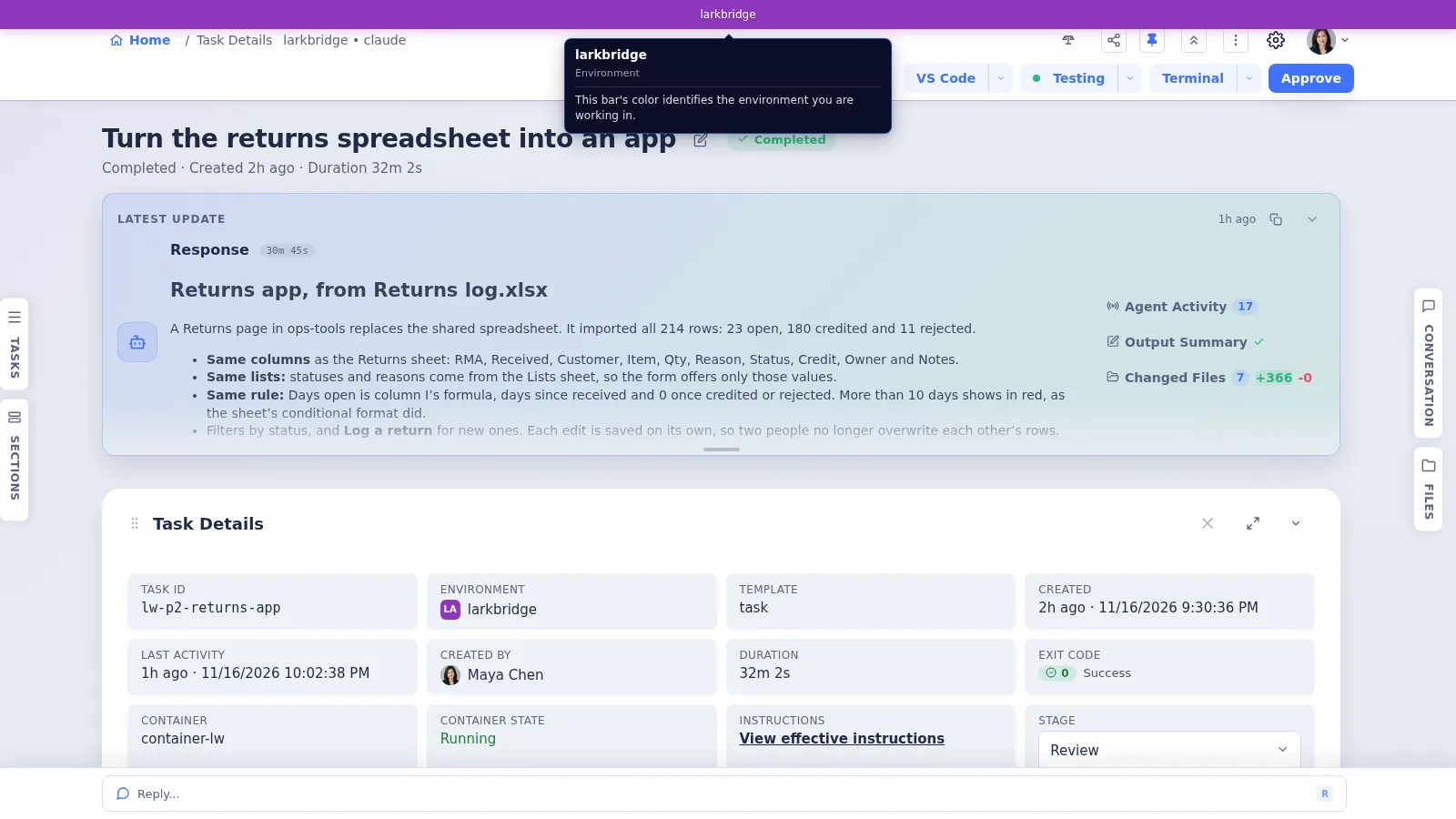
CoderFlow reads the file and explains what it does, including the rules hidden in formulas and macros. It then builds the app you describe with your existing data imported, and you try it side by side with the spreadsheet before switching over.
What You Gain
One shared version of the data, forms that catch mistakes, permissions, a record of who changed what, and an app that works on phones. Changes are made by describing them.
Questions
How Do I Know If My Spreadsheet Should Be an App?
Look for several editors, costly mistakes, customer, order or inventory data, formulas only one person understands, or data copied out by hand. If two or more apply, CoderFlow can turn it into an app you try and approve.
What Happens to Our Spreadsheet Data When We Move to a CoderFlow-Built App?
CoderFlow imports the existing rows, so history and current records are there on day one. You can keep the spreadsheet as a read-only reference until everyone is comfortable with the switch.
Should Every Spreadsheet Become an App?
CoderFlow is for the spreadsheets that have become shared systems the business depends on. Spreadsheets are still the best tool for analysis, planning, quick lists and one-person work.