
Your Apps. Your Data. Your Agents at Work.
Agents work on the applications, databases and custom software you already run, and every change goes through testing and approval.
Connect the Stack You Run Today.
From PostgreSQL and MySQL to your CRM, cloud apps and custom software. Each page explains the connection, setup and available workflow.
PostgreSQL
Turn operational data into answers, reports and agent workflows.
Explore the Workflow →MyMySQL
Bring application data into reports and recurring work.
Explore the Workflow →SFSalesforce
Connect customer and opportunity data to work across your business.
Explore the Workflow →D365Dynamics 365
Bring sales, finance or operations context into agent workflows.
Explore the Workflow →NSNetSuite
Connect ERP records to the teams and applications around them.
Explore the Workflow →365Microsoft 365
Start agent work when an email arrives in a configured intake mailbox.
Explore the Workflow →JSNode.js / TypeScript
Direct agents to improve your JavaScript and TypeScript applications.
Explore the Workflow →PyPython
Improve Python applications, data jobs and internal tools with agents.
Explore the Workflow →</>Custom Applications
Connect the applications your team built to the agents your teams direct.
Explore the Workflow →MDBMongoDB
Use application documents as context for agent-led analysis and work.
Explore the Workflow →SNSnowflake
Turn warehouse data into business answers and recurring reports.
Explore the Workflow →HSHubSpot
Bring CRM context into follow-ups, reports and work across applications.
Explore the Workflow →SSlack
Start agent tasks and follow up from a Slack conversation.
Explore the Workflow →TMicrosoft Teams
Start agent tasks and guide the work from Teams chat.
Explore the Workflow →Bring the Code Behind Your Business.
Explore 32 platforms, including .NET, Java, SQL Server and COBOL. These coverage labels describe source-code support; connecting to a running application is a separate setup.
Web Apps, Modern Stacks and Integrations
Custom .NET Applications
Line-of-business apps, portals and services in C# or VB.NET, from .NET Framework and Web Forms to modern .NET.
Learn More →Custom Java Applications
Java EE, JSP, Struts and Spring applications that run orders, claims, portals and back-office work.
Learn More →Custom PHP Applications
Customer portals, order systems and internal tools built in PHP, from hand-written code to Laravel and Symfony.
Learn More →WordPress Sites and Custom Plugins
Company sites, online stores, member portals and the custom plugins and themes behind them.
Learn More →Custom Work Around Your ERP
The integrations, extensions, custom reports and spreadsheet tools your team built around a packaged ERP.
Learn More →Database and 4GL
MultiValue (Pick, UniVerse, UniData)
Pick-style databases and BASIC programs running distribution, finance and healthcare operations.
Learn More →Oracle Forms and Reports
Forms, triggers and PL/SQL that run order management, finance and operations on Oracle.
Learn More →Progress OpenEdge (ABL)
Homegrown and heavily customized ABL applications running ERP, distribution and manufacturing.
Learn More →SQL Server Stored-Procedure Applications
Applications whose business rules live in T-SQL stored procedures, triggers, views and SQL Agent jobs.
Learn More →Oracle APEX Applications
Low-code apps built in APEX, with business rules in PL/SQL packages, page processes and validations.
Learn More →COBOL, Mainframe and Midrange
Desktop and Database Apps
Microsoft Access
Desktop databases with forms, queries, reports and VBA that run orders, inventory, billing and member records.
Learn More →VB6 and Delphi
Windows desktop applications with years of business rules in forms, modules and stored procedures.
Learn More →PowerBuilder
Client-server applications built on DataWindows, with logic spread across windows and user objects.
Learn More →Spreadsheets, Documents and No-Code Tools
Excel Workbooks and VBA Macros
Workbooks and macros that grew into the system your business runs on, from quoting and scheduling to inventory and month-end.
Learn More →Power Apps and Power Automate
Canvas apps, flows and lists that grew from a quick fix into a business process.
Learn More →SharePoint and InfoPath
Lists, InfoPath forms and workflows that run requests, approvals and tracking across the company.
Learn More →Also Supported
- Google Sheets Replace and automate
- Airtable and Smartsheet Replace and automate
- FileMaker Replace and automate
- Visual FoxPro Understand and change
- Gupta SQLWindows Understand and change
- Uniface, Magic, Clarion Understand and change
- Classic ASP Understand and change
- ColdFusion Build and test
- Lotus Notes Understand and change
- Caché / MUMPS Build and test
- Informix 4GL Build and test
- Synergy DBL Build and test
- OpenVMS Understand and change
- Natural / Adabas Understand and change
- IBM mainframe Understand and change
Don't See Your System?
If your business runs on something you built, customized or keep in spreadsheets, we'd like to hear about it.
What Each Level Means
CoderFlow's depth varies by platform. Each system page says what is available today.
Agents change, build and run the code in a CoderFlow environment with your toolchain.
Agents document, explain and change the source. Your team builds and tests.
CoderFlow builds the apps, integrations and automations that take over the manual work. You try them and approve them.
One Platform Between Your Systems and Your Agents.
CoderFlow brings application tools, business data and code into one agent workflow, through the connections IT makes available to each team. Every code change still needs a person's approval.
Demonstration data · Fictional company
| Connection | What agents can reach | What they can do | Setup |
|---|---|---|---|
| Application APIs | Applications and services through APIs IT makes available | What the API allows, within its credentials | IT configures access; custom systems may need an API first |
| SQL Server | The database the connection points to | What its login allows; use a read-only login to only read | IT adds the host, database and login |
| SSH | A build or test server | Commands the SSH user can run, such as builds and tests | IT adds the host, user and key |
| MCP servers | Tools another application exposes over MCP | The tools that server offers, with credentials IT stores | IT attaches HTTP MCP servers to an environment |
| Git (GitHub, Azure DevOps, CoderFlow-hosted Git) | The repositories in the environment | Commit, branch or open a pull request after approval | IT connects the provider; each operation uses a short-lived token |
| Webhooks and SCM polling | Signed events and changes on watched branches | Start a task, deployment or documentation publish | An admin creates the webhook and the automation |
| Slack and Microsoft Teams chat | Messages people send to the CoderFlow bot | Start a task and follow up in the same conversation | IT configures the integration (Teams: chat only) |
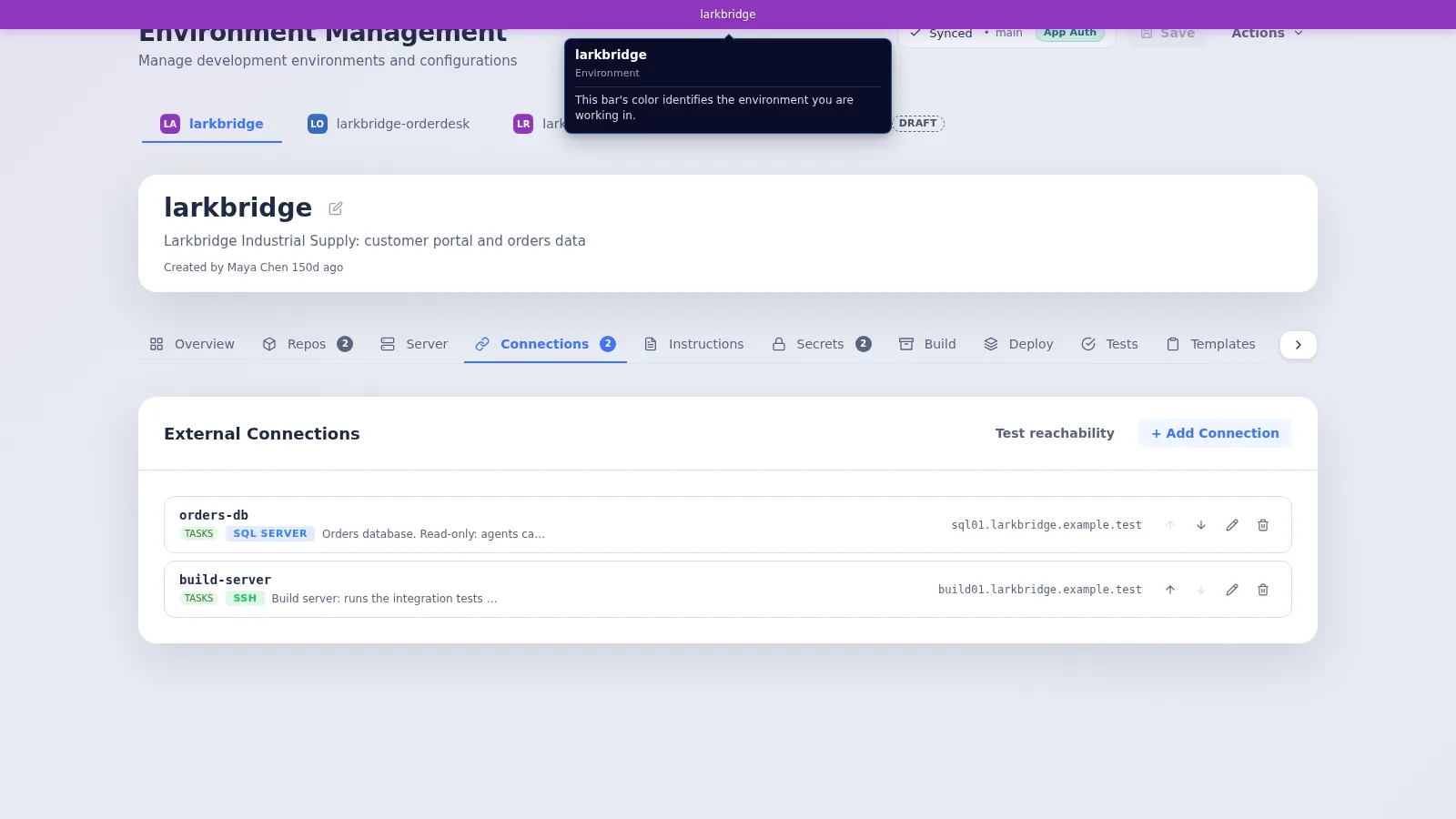
Beside a web application, the CoderFlow for Business assistant explains what's on the screen. It never presses keys or changes anything in the application. Ask us about a system that isn't listed.
Bring Business Context Into Software Changes
Documentation and Q&A
Self-maintaining documentation and plain-language answers with sources.
Impact Analysis
See what a change will touch before anyone starts.
Agents With Human Approval
Agents prepare changes in isolated containers. Your team approves every one.
Change Management for AI
Parallel tasks, AI judges, review and a full audit trail.
IT Requests
Business requests that arrive with context and become agent work.
Your Models, Your Rules
IT chooses the AI providers and sets the guardrails.
Questions About Your Systems
Which Systems Does CoderFlow Work With?
Web apps and modern stacks (.NET, Java, PHP, SQL Server, WordPress, ColdFusion), database and 4GL platforms, COBOL and mainframe, desktop and database apps (VB6, PowerBuilder, Access, FileMaker), and spreadsheets and no-code tools (Excel, Google Sheets, Airtable, Smartsheet, Power Apps, SharePoint). Depth varies by platform, and each system page says what works today. If yours isn't listed, talk to sales.
What Do the Coverage Levels Mean?
Build and test means agents compile and run the code with your toolchain. Understand and change means agents document, explain and prepare changes your team builds. Replace and automate means CoderFlow builds apps and automations that take over spreadsheet, document and no-code work.
Does CoderFlow Work With Legacy Systems?
Yes. Many of the systems on this page are what people call legacy systems: COBOL, VB6, PowerBuilder, Oracle Forms and more. CoderFlow documents them, makes them easier to change with AI agents and human approval, and supports staged rebuilds, without a rip-and-replace.
Can Agents Build Windows-Only Applications Like VB6 or PowerBuilder?
Not inside CoderFlow's Linux containers. For Windows-only toolchains, agents document the application, explain its rules and prepare changes your team builds on its existing machines, or rebuild parts as web apps over the same data. Everything still goes through review, approval and Git.
Can CoderFlow Help With Cyber Security on These Systems?
Yes. CoderFlow agents can sweep any of these systems for security weak spots, check new code changes and apply urgent security updates, using the analyzers and tests you install, with a person approving every fix. Where the toolchain runs in CoderFlow's Linux environments, agents rebuild and test each fix; for Windows-only tools, they prepare it for your team. See application security.
Tell Us About Your System.
Every custom system is different. Talk to sales about yours, or start with a Reimagine engagement.