
Airtable and Smartsheet With CoderFlow
Bases, sheets, forms and automations that started as a quick fix and now run real operations.
Built from your base: its data, its fields, its rules. Not from a blank page.
// Automation: on new order, set priority and owner
let { recordId } = input.config();
let orders = base.getTable('Orders');
let order = await orders.selectRecordAsync(recordId);
let due = new Date(order.getCellValue('Due date'));
let daysLeft = (due - new Date()) / 86400000;
let tier = order.getCellValueAsString('Customer tier');
let rush = daysLeft < 3 || tier === 'Gold';
await orders.updateRecordAsync(recordId, {
  'Priority': { name: rush ? 'Rush' : 'Standard' },
  'Owner': rush ? { id: 'usrRushDesk' } : null,
});
// Smartsheet status column formula:
// =IF(AND([Due Date]@row < TODAY(),
//     Status@row <> "Shipped"), "Late", "")
Orders due in less than three days, plus every order from a Gold-tier customer no matter when it is due. Rush orders go to the rush desk automatically. The rule runs only when an order is created, so changing a due date later never updates the priority.
Illustrative example with synthetic code.
Running on Airtable and Smartsheet Today
Record limits, automation limits and seat costs pinch just as the process gets busy.
Logic is spread across formulas, automations, scripts and add-ons that nobody has written down.
Customers, partners or field staff need access, and sharing the whole base is not an option.
What CoderFlow Does for Airtable and Smartsheet
Documentation and Q&A
Plain-language documentation of your Airtable bases and Smartsheet sheets, and answers with sources for anyone on your team.
Built for You, Approved by You
Describe what you need. CoderFlow builds and tests the app, and you try it before anyone relies on it.
Your Own App, Built Around Your Process
A web app with the tables, forms, views and automations you rely on, plus the logins, roles and portals that are hard to get from a shared base.
Rules Written Down and Tested
Formulas, automations and scripts become documented, tested rules in the app, so they keep working as the business changes.
Answers About Your Base, in Plain Language
Ask how a field, formula or automation works and get an answer that shows where it came from.
Explore CoderFlow for Business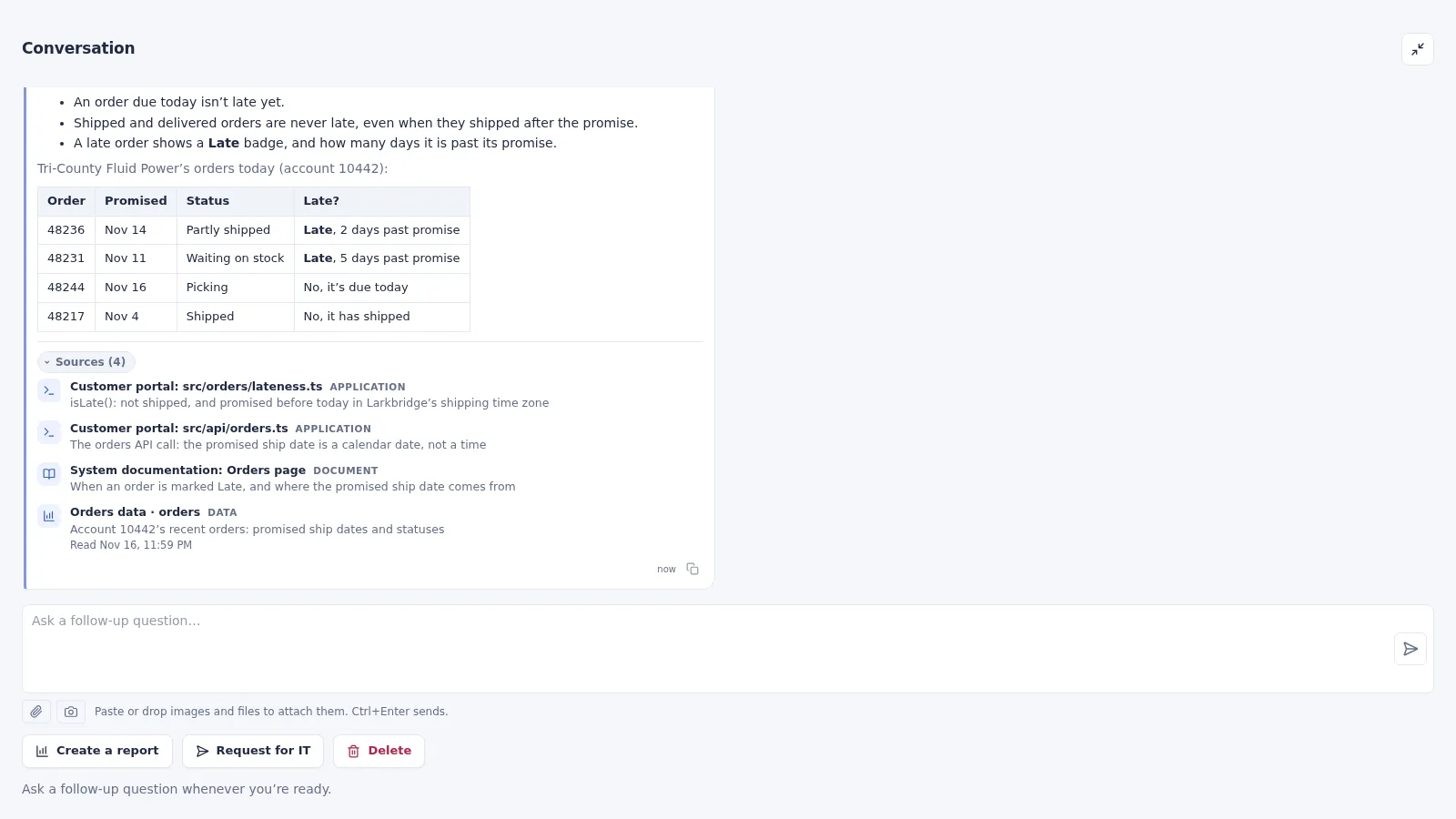
How It Connects
Export your bases or sheets to CSV and share the formulas, automations and scripts, and CoderFlow builds and tests the new app in its own workspace. For a gradual switch, the app can sync with Airtable or Smartsheet through their APIs using access you set up.
Keep It, or Move Forward
Keep Airtable or Smartsheet for planning and quick lists. Move the process that needs real access control, more records or a customer-facing portal into its own app.
A Production Tracker With a Customer Portal
A print shop tracks orders in Airtable and answers "where is my order?" calls all day. The owner describes the workflow, CoderFlow builds an order app with a customer status portal, and staff try it alongside the base before the owner approves. Profound Logic hosts it on CoderFlow Cloud.
Walkthroughs for your system are coming. Meanwhile, explore CoderFlow on a web app, or see how it works in the 2-minute quick look.
Airtable and Smartsheet Questions
Can CoderFlow Replace an Airtable Base or Smartsheet With Our Own App?
CoderFlow builds a web app with the same tables, forms, views and automations, plus logins, roles and portals for staff or customers. You try it with your own data and approve it when it works.
Can CoderFlow Explain the Formulas and Automations in Our Airtable or Smartsheet?
CoderFlow explains in plain language what each formula, automation and script does, when it runs and which records it changes. It also points out gaps, such as a rule that runs only when a record is created and never when it's edited.
Do We Need Developers to Move From Airtable or Smartsheet to a CoderFlow App?
CoderFlow works from a plain-language description by the owner or the person who built the base, then builds the app for you to try and approve. Profound Logic can host it on CoderFlow Cloud, and if you have IT, they can review every change.
Can a CoderFlow App Keep Working With Airtable or Smartsheet During the Switch?
CoderFlow can build the new app to read from or write to Airtable or Smartsheet through their APIs, using an access token you set up, so both stay in step while people move over.
How Does CoderFlow Move Our Airtable or Smartsheet Data Into the New App?
CoderFlow builds an import from CSV exports or the Airtable and Smartsheet APIs and tests it with your real records, including linked records and choice fields. You check that counts, totals and statuses match before anyone switches.
How Do We Get Started Replacing Airtable or Smartsheet With CoderFlow?
Choose one base or sheet that runs an everyday process, such as job tracking or approvals, and talk to sales. We'll show you how CoderFlow would build it, hosted by Profound Logic on CoderFlow Cloud.
Related systems
Industries where we often see Airtable and Smartsheet
Take the Manual Work off Your Plate.
Tell us what you need and we'll show you how CoderFlow would build it, or start with a Reimagine engagement.