
Visual FoxPro With CoderFlow
Desktop database applications with forms, reports and DBF data that still run core operations.
Start with one defined workflow on the systems you already run, then expand as it proves itself.
* PROCEDURE CalcDiscount  (prg\pricing.prg)
LPARAMETERS tcCustId, tnQty, tnPrice
LOCAL lnDisc
SELECT customer
SEEK tcCustId ORDER custid
lnDisc = IIF(customer.tier = "G", 0.10, 0.05)
IF tnQty >= 100
   lnDisc = lnDisc + 0.03
ENDIF
* Promo override added 2009, never removed
IF DATE() > {^2009-01-01} AND customer.region = "W"
   lnDisc = lnDisc + 0.02
ENDIF
RETURN ROUND(tnPrice * tnQty * (1 - lnDisc), 2)
Gold-tier customers get 10% and everyone else 5%, plus 3% for 100 or more units. Western-region customers get another 2% from a 2009 promotion that was never switched off.
Illustrative example with synthetic code.
Running on Visual FoxPro Today
Forms and classes are stored in table files that ordinary tools can't read.
The data lives in DBF files that are hard to report on safely.
Microsoft ended support years ago, and the people who know the system are few.
What CoderFlow Does for Visual FoxPro
Documentation and Q&A
Self-maintaining documentation of your Visual FoxPro applications, and plain-language answers with sources for business users and developers.
Impact Before Change
See which programs, files and screens a change will touch before anyone starts.
Changes Prepared by Agents
Agents prepare changes in isolated containers. Your team builds and tests them with its existing toolchain, then approves.
Into Git, Reviewed Forever
PRG files are text. Forms (.scx) and class libraries (.vcx) are converted to a text form first, and CoderFlow keeps the text version under review.
Rules Surfaced From Code and Data
CoderFlow explains how pricing, discounts and statuses really work, including rules that were added years ago and forgotten.
Plan a Move Without a Cliff
If you decide to move, agents can rebuild screens as web pages and help move data to a SQL database in stages.
Answers About Your Visual FoxPro System, Without a Ticket
With CoderFlow for Business, people in operations, finance and customer service ask how the system works and get answers drawn from its source code and documentation, with sources. Reports can pull data through web APIs your IT team makes available, and requests reach IT with the context attached.
Explore CoderFlow for Business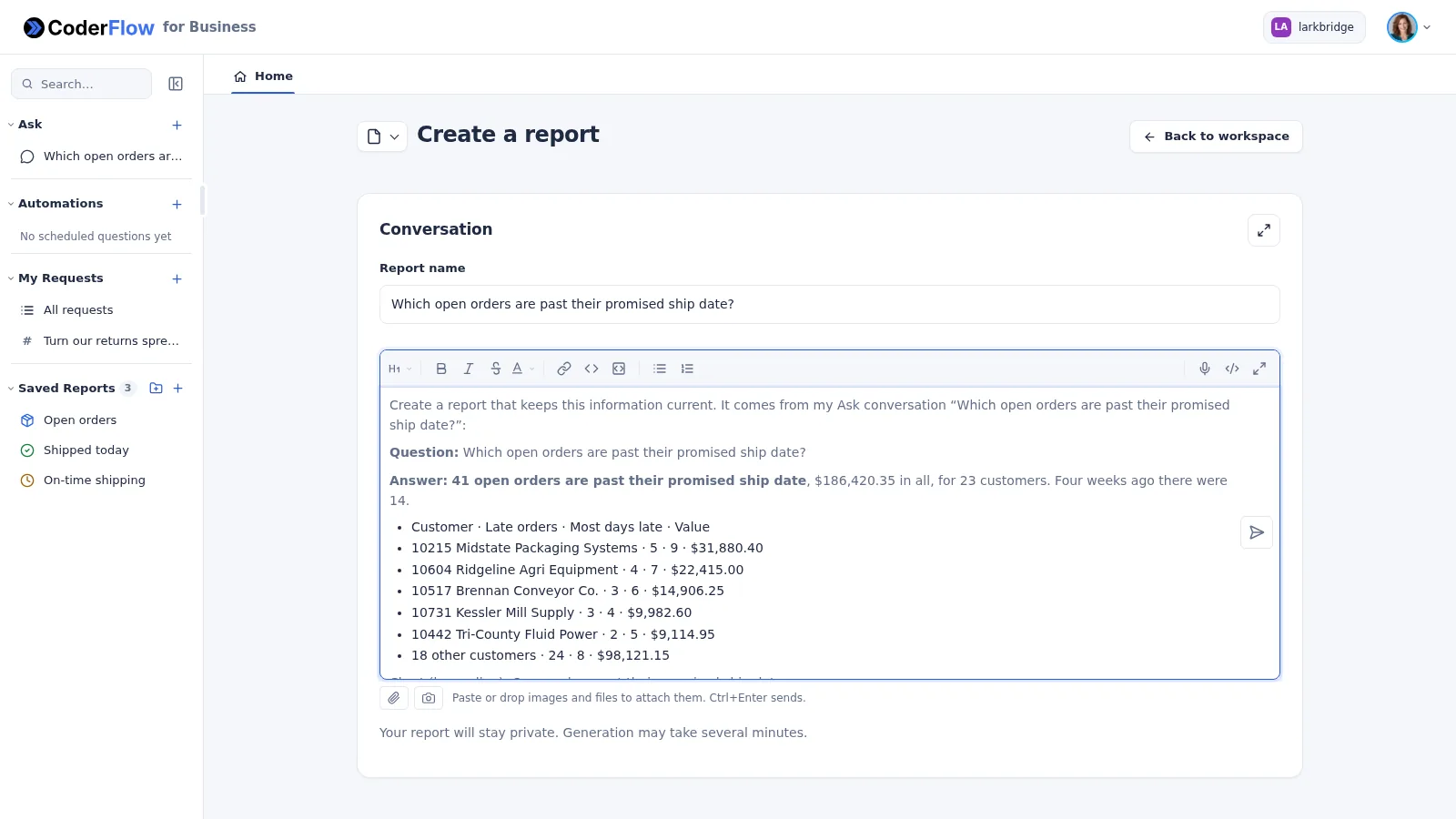
How It Connects
Agents work on source and converted forms in Linux containers. Running and building the application uses Visual FoxPro on Windows.
Keep It, or Move Forward
Keep it running while you understand it fully, then decide. Many FoxPro teams document everything first and move in stages.
A Forgotten Promotion, Found
Sales asks why western-region quotes come out lower. Ask traces it to a 2009 promotion that was never switched off. Finance decides to remove it, and IT has an agent make and document the change.
Walkthroughs for your system are coming. Meanwhile, explore CoderFlow on a web app, or see how it works in the 2-minute quick look.
Visual FoxPro Questions
Can CoderFlow Document a Visual FoxPro Application?
CoderFlow reads PRG code plus forms (.scx) and class libraries (.vcx) converted to text with tools such as SCCTEXT or FoxBin2Prg, and documents screens, procedures and data. It explains how pricing, discounts and statuses really work, with the source files behind every answer.
How Does CoderFlow Work With Visual FoxPro If FoxPro Only Runs on Windows?
Agents read, explain and change the text source in Git inside Linux containers, but Visual FoxPro is Windows-only, so they can't compile, run or test the application. Your team regenerates forms and classes from text, builds and tests on Windows, then approves the change in CoderFlow.
Can CoderFlow Report on Visual FoxPro DBF Data?
CoderFlow reports on DBF data through web APIs your IT team exposes; there's no direct DBF connection today. Ask in CoderFlow for Business explains how the application works from its source code and documentation.
Is Visual FoxPro a Legacy System, and Can CoderFlow Modernize It Without a Rewrite?
CoderFlow documents the FoxPro application as it runs today, and agents prepare changes your team builds and tests in FoxPro on Windows. When you are ready, agents rebuild screens as web pages and help move DBF data to a SQL database in stages, while the business keeps running.
How Do We Get Started With CoderFlow for Visual FoxPro?
Start with the FoxPro programs and converted forms for one business area, and have CoderFlow document the rules and data flows. Talk to sales about the full platform, or a Reimagine engagement that plans the move off FoxPro in stages.
Where Does Our Visual FoxPro Code Go When CoderFlow Works on It?
It stays on the server you choose: your own Linux server, on premises or in your cloud, or CoderFlow hosted by Profound Logic. Each task runs in its own isolated container, AI requests go only to the providers IT configures, and a person approves every change.
Industries where we often see Visual FoxPro
Bring AI to Your Visual FoxPro Applications.
Talk to sales about your setup, or start with a Reimagine engagement.