
If a VB6, PowerBuilder or Delphi application still runs your business, you don't have to choose between leaving it alone and rewriting it all at once. AI agents can document the application, prepare changes your team builds on Windows, and rebuild screens as web apps one module at a time over the same database.
Why Are So Many of These Apps Still Running?
Because they work: they still check credit, price quotes and schedule jobs. But Microsoft's support statement says the Visual Basic 6.0 IDE has not been supported since April 8, 2008, with the runtime supported for the lifetime of supported Windows versions, limited to serious regressions and critical security issues (Microsoft, Support Statement for Visual Basic 6.0). Visual FoxPro is no longer supported by Microsoft at all.
What Are Your Options?
- Keep and maintain: document the application, then change it with less risk.
- Extend around it with web screens, reports or APIs over the same database.
- Rebuild in stages, one module at a time as a web application.
- Replace it, when the process is a commodity.
Most companies mix them, rebuilding the most troublesome modules first.
What Can AI Do With Windows-Only Toolchains?
The source is mostly text, such as VB6 .frm and .bas files, Delphi .pas files and exported PowerBuilder objects. AI agents read it well, trace logic across event handlers and stored procedures, and prepare code changes.
Agents in CoderFlow can't compile or run the desktop app, because those toolchains are Windows-only and agents work in Linux containers. Your team builds and tests prepared changes on Windows, while rebuilt web modules are built and tested inside CoderFlow.
How to Rebuild a Desktop App as a Web App, One Module at a Time
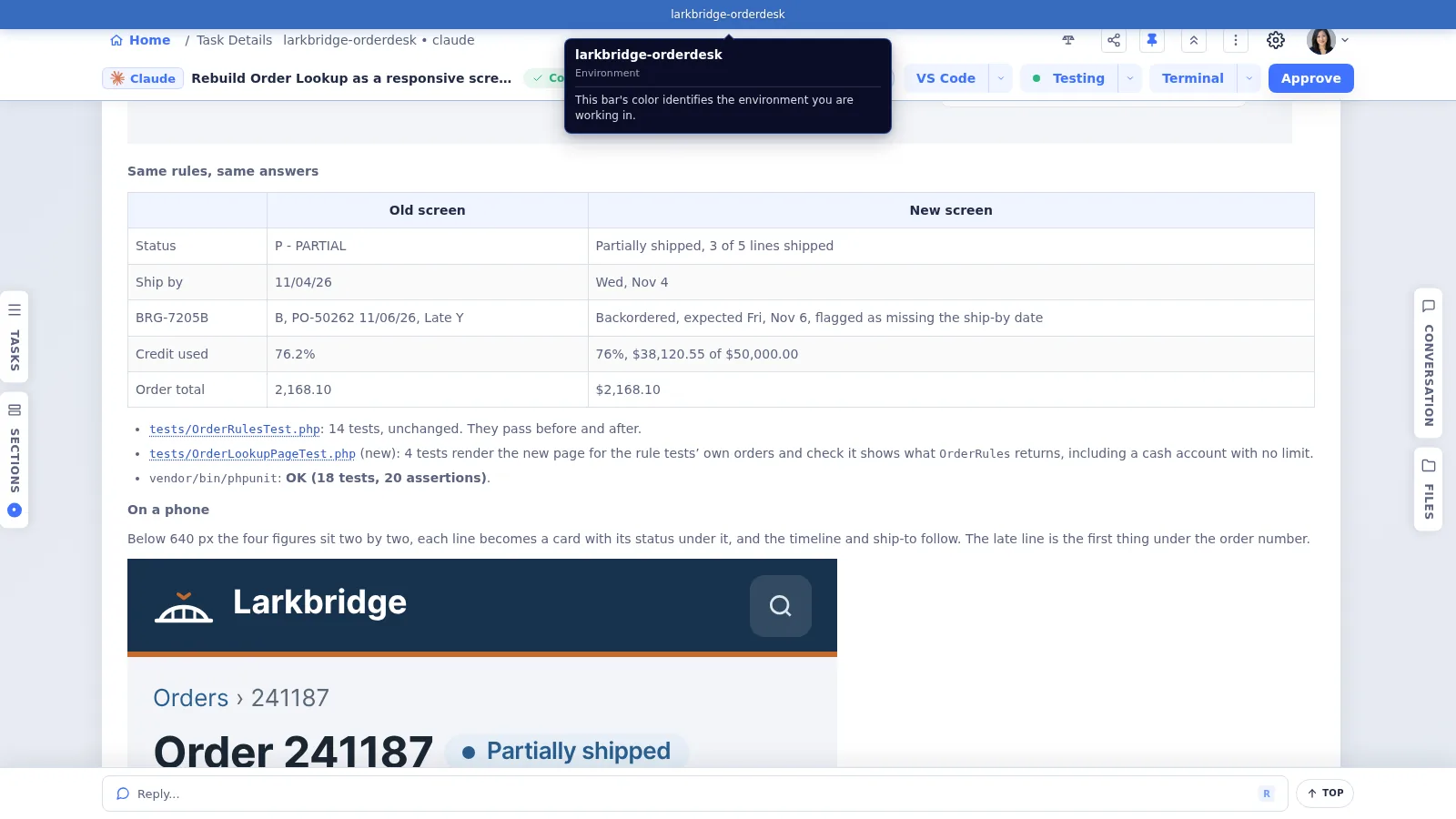
Rebuild one module over the same database, then compare the old and new screens on the same orders until people trust them. Each module you move makes the next one easier.
- Get the source, including database scripts, into Git.
- Document the whole application, including registry settings and stored procedures.
- Pick a first module with clear boundaries, such as order inquiry.
- Rebuild it, run both side by side, then retire the old module.
How CoderFlow Helps
CoderFlow documents VB6 and Delphi, PowerBuilder and Visual FoxPro applications from their source, answers questions with sources and shows what a change will touch before it starts.
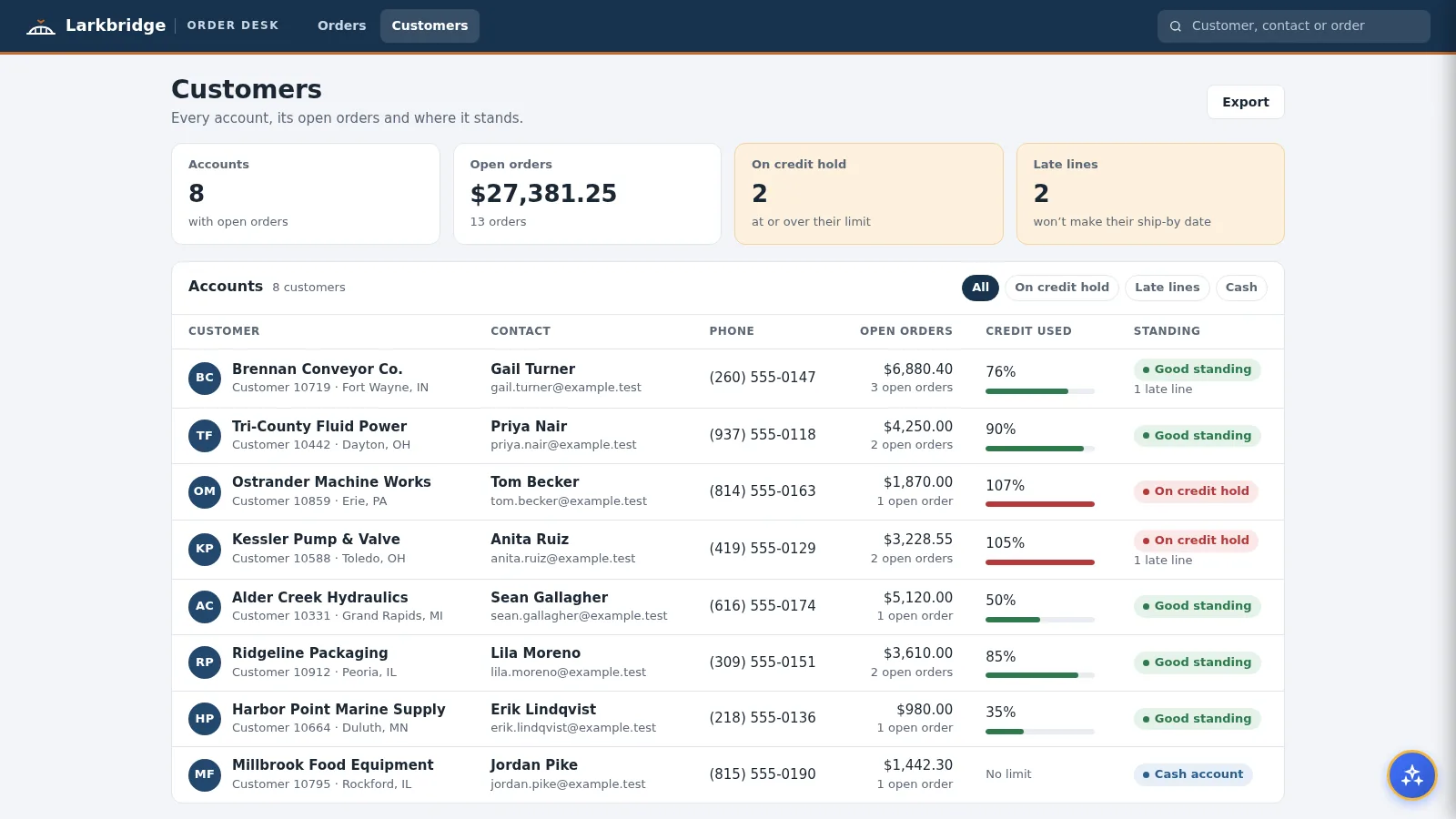
With interface reimagining, agents rebuild forms as web screens over the same database, keeping familiar workflows. Every change waits for a person to approve it.
What Should You Watch out For?
- Third-party OCX and ActiveX controls often have no direct web equivalent.
- Registry settings and INI files can change behavior from PC to PC.
- Binary form resources and PBL libraries should be exported to text.
- Desktop changes are only as safe as your Windows build and test step.
Decide With Facts, Not Guesses
Start by documenting one module; once you can see the rules, the right option is usually clear. Talk to sales about your application, or start with a Reimagine engagement.
Questions
Can CoderFlow Compile or Run a VB6, PowerBuilder or Delphi Application?
CoderFlow agents read and document VB6, Delphi, PowerBuilder and Visual FoxPro source, trace business rules and prepare changes, which your team builds and tests on its Windows build machine because those toolchains are Windows-only. Web modules rebuilt by agents are built and tested inside CoderFlow.
Is It Better to Rewrite a VB6 Application or Futurize It in Stages?
With CoderFlow, most businesses do better in stages: document the VB6 application, keep maintaining it, and rebuild one module at a time as a web application over the same database. A full rewrite has to rediscover every rule before anyone benefits.
Are VB6 and PowerBuilder Legacy Systems That Must Be Replaced?
CoderFlow documents VB6 and PowerBuilder apps, prepares reviewed changes your team builds on Windows, and can rebuild modules as web apps when you are ready. Replace an application only when the process is a commodity or the platform truly can't meet a requirement.